

Online Ruler: Calibrated Screen Measurements in cm, mm, and Inches
Business & Productivity ToolsDescription
Free online ruler for on-screen measurement in centimeters, millimeters and inches, with bank-card calibration and physical verification guidance.
What It Appears to Do
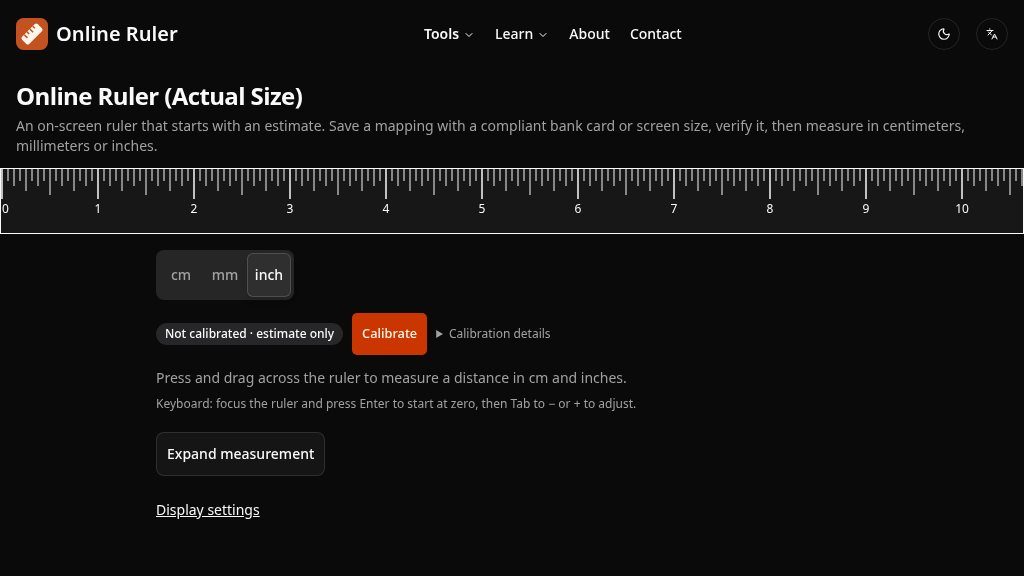
Measuring a small object without a physical ruler is usually easy only when approximate sizing is acceptable. RulerMeasurements.com addresses that gap with an on-screen ruler designed to match a calibrated display. It supports centimeters, millimeters, and inches, allowing visitors to place an object against the screen or drag across the ruler to estimate a distance.
The important distinction is that the page does not treat a browser’s default pixel estimate as automatically accurate. Until calibration is completed, the ruler identifies its result as an estimate and explains why screen resolution and pixel ratio alone cannot reveal a display’s physical dimensions.
How the Experience Is Organized
The main interface presents a ruler with selectable unit tabs and options to display the scale along the top, left, or right edge. A full-screen mode is available where the browser supports the Fullscreen API. Users can also press and drag across the ruler, or use keyboard controls after focusing the measurement area.
Calibration is organized around two reference methods. The recommended approach uses a bank card confirmed to follow the ISO/IEC 7810 ID-1 format, matching its stated 85.60 × 53.98 mm dimensions to the on-screen guide. Alternatively, visitors can enter their display’s visible diagonal size from device specifications. The page recommends verifying either setup against a physical reference.
Strengths
- Supports cm, mm, and inch measurements with visible unit switching
- Offers bank-card calibration alongside a screen-diagonal method
- Includes physical verification guidance and clear accuracy caveats
- Runs calculations locally according to the supplied page information
Cons
- Uncalibrated measurements may be substantially inaccurate, especially on high-DPI or phone displays
- Results can change with zoom, display scaling, viewing angle, or screen hardware
- Not intended for strict-tolerance, medical, legal, financial, or longer-distance measurements
Notable Capabilities
- Measurements can be viewed in mm, cm, and inches without leaving the tool.
- Calibration adjustments can be made in 0.5 CSS pixel steps and saved in the browser.
- The interface warns about browser zoom and explains that changing displays, scaling, or device conditions may require recalibration.
- Touch dragging is supported, with a layout that adapts between larger screens and phone-sized viewports.
- The page explains its limitations, including curved screens, thick screen protectors, viewing angle, and endpoint placement.
- It states that calculations run locally and that preferences and calibration are stored in browser localStorage.
Where It May Fit
This tool appears suited to quick checks involving objects that fit flat against a screen: a ring, watch band, screw, phone case, jewelry item, plant cutting, or photo print. It may also help confirm whether a downloaded pattern was printed at the intended scale, although the page distinguishes this use from a printable ruler that depends on printer scaling.
For longer objects, strict tolerances, or legal, medical, and financial decisions, the site itself recommends using a physical ruler or calipers instead. That caution is central to using the tool responsibly.
What to Verify
Before relying on a result, confirm that browser zoom is 100%, calibrate with a compliant reference when possible, and check the saved mapping against a physical object. Visitors should also verify how their browser, display scaling, touch interaction, and full-screen support behave. Overall, this is a practical browser-based measurement aid for approximate everyday checks, rather than a substitute for precision instruments.
Embeds
Copy short script widgets for this listing. People often use Textfrog to search for their next personal or work tool. Encourage your community to leave reviews on Textfrog.
Review widget
A clean review badge with stars and review count.
Featured badge
A compact badge for products listed on Textfrog.
Similar Tools
Decks, dashboards, reports and invites are HTML now. with practical details for ...
Capital Gurus offers customized small business loans and financing solutions for...
Automated, accurate, actionable bookkeeping and trial balance software for moder...
Melio automates bill capture, payment processing, and bookkeeping sync, saving b...
Featured Links
Setvo: your workouts, your progress, your space. with practical details for onli...
Eduify is an online education platform that provides tools and resources for lea...