Skeleton AI
Skeleton AI Video Generator: Short Explainer Videos from Text or Images

Transform a photo with image to image AI. with practical details for online visitors.
Added November 14, 2026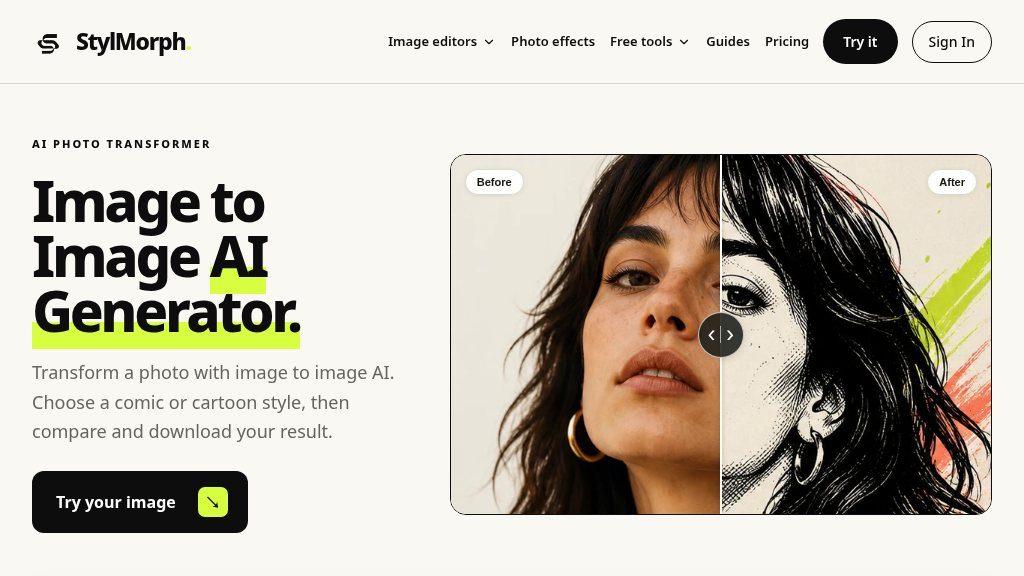
Visitors considering StylMorph are likely deciding whether they want a quick, browser-based way to redraw an existing photo as comic art, cartoon artwork, or a game-inspired scene—without starting from a blank canvas. The tool focuses on image-to-image transformation: upload a JPEG, PNG, or WebP file, choose a visual direction, and generate an edited version for comparison and download.
The homepage presents the service as a photo transformer rather than a general-purpose image editor. It changes visual details such as outlines, colors, and shading while using the uploaded image as the source. Uploads can be up to 10 MB, which should cover many everyday photos, though visitors with larger originals will need to prepare them first.
The main generator includes six styles divided between comic and cartoon treatments:
The workflow is straightforward: upload an image, select a style, choose an image model, and start the transformation. Users can switch between the original and result using an on-page comparison view. A separate model comparison option lets visitors run the same photo and style through Seedream 4.5 and Nano Banana Pro, although the page states that this uses two purchased credits in total.
StylMorph also lists a separate Game Art Filter with open-world, neon future-city, and pixel-art directions. Another related option turns a photo into printable black outlines on a white background for a coloring-page effect.
The tool may suit profile-image experiments, illustrated portraits, social content, concept sketches, comic-style references, and playful reinterpretations of personal photos. The comparison control is particularly useful when the goal is to judge how much the generated image departs from the source rather than simply view a standalone result.
For quick supporting tasks, the site also links to local browser tools for editing, adding speech bubbles, making Instagram grids, calculating aspect ratios, removing supported JPEG metadata, and assembling before-and-after images.
StylMorph appears most relevant to casual creators, hobbyists, social-media users, and anyone testing several illustrated treatments without installing desktop software. A free Seedream 4.5 trial is available when offered, and the page states that the first successful trial image does not require an account. Paid use requires signing in and purchasing credits; the listed credit packs start at $6.99, and credits do not expire.
The page says originals and results are private download links that expire after 24 hours, so anyone who wants to keep an output should download it promptly. Visitors should also assess results with their own photos, since the page only indicates that clear subjects and usable lighting generally help the model. Verify the current trial availability, credit cost, and output suitability before using the service for important or print-dependent work.
For fast, style-led photo experiments, StylMorph is worth investigating. It is a focused transformer rather than a full creative suite, making it a better fit for quick visual variations than detailed manual editing.
Copy short script widgets for this listing. People often use Textfrog to search for their next personal or work tool. Encourage your community to leave reviews on Textfrog.
A clean review badge with stars and review count.
A compact badge for products listed on Textfrog.
Skeleton AI Video Generator: Short Explainer Videos from Text or Images
Video Translate Review: AI Video Dubbing with Voice Cloning
Ozil Goal AI Review: Personalized Football Videos from One Photo
Stivio Image to Video AI Generator: Turn Photos into HD MP4 Clips