
Cursive Text Generator: Free Unicode Cursive Fonts Online
OtherDescription
Create beautiful cursive text online with 52 free cursive fonts. with practical details for online.
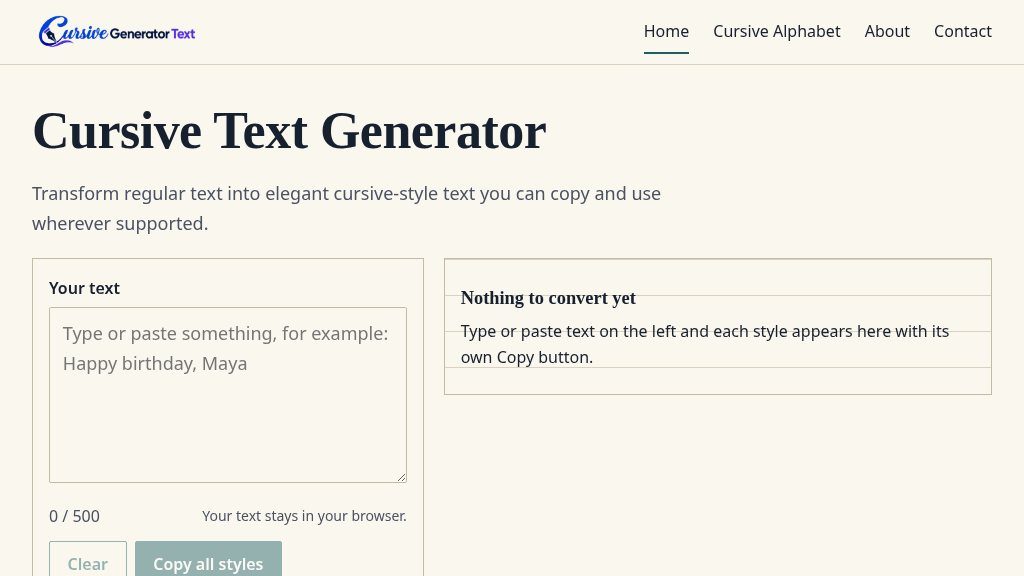
Website Overview
People looking for decorative text usually have a practical choice to make: should they copy Unicode-styled letters for a bio, message, or document, or use a handwriting font that may not travel with the text? Cursive Text Generator is designed for the first option, while also showing the difference between copyable Unicode characters and a device-based font preview.
The site describes 52 free cursive fonts and provides an online workspace where visitors can type or paste up to 500 characters. It does not require an image upload or font installation for the Unicode-based styles. Since the supplied evidence does not show account, pricing, or download requirements, visitors should treat the tool as a browser-based text generator rather than assume it offers a broader font library or editing suite.
Experience and Functionality
The interface is direct: enter text, review the generated styles, and use the individual Copy button beside the preferred result. A Copy all styles option is also available. The page identifies several style types, including script, bold script, Fraktur, bold Fraktur, italic, and bold italic. It clearly labels Fraktur and italic variants that are not technically cursive, which is useful when comparing visual appearance with writing style.
A key strength is the explanation of how the output works. Unicode characters remain part of the copied text, whereas the handwriting preview depends on a font installed or supported by the viewer’s device. The site also notes that unsupported characters may appear as boxes or revert to plain letters, and that some styles leave missing numerals or letters unchanged. That warning sets realistic expectations before the text is posted elsewhere.
Strengths
- Clear copy-and-paste workflow with individual style buttons
- Explains the difference between Unicode text and non-copyable handwriting-font previews
- Warns about unsupported letters, numerals, boxes, and inconsistent display across devices
- Includes lowercase and capital letter guides with specimens and example words
Cons
- Unicode cursive may render differently or fail to display in some apps and on some devices
- Certain styles may leave unsupported letters or numerals as ordinary typed characters
- Decorative Unicode text may be unsuitable for readers using screen readers
Useful Scenarios
This generator may suit social media bios, casual messages, decorative headings, and other places that accept pasted Unicode text. The preview step matters because display varies between browsers, phones, and apps. The site specifically cautions against relying on such text where screen-reader users may be affected by characters being read by their technical names.
For visitors interested in handwriting rather than decorative copy, the individual letter guides add a different use case. Lowercase and capital letters can be explored separately, with specimens, example words, and related letters. These pages are more useful for reference or practice than for producing connected handwriting.
Who May Benefit
It is a practical option for casual users who want quick style variations without installing software. It may also help learners compare cursive letter forms, although the site appropriately notes that handwriting models differ and should be checked against a teacher’s or course’s preferred form.
Final Perspective
This is a focused, transparent utility for generating copyable Unicode text and examining cursive letter examples. Its strongest qualities are the simple workflow and clear explanation of compatibility limits. Users needing true connected handwriting, guaranteed cross-platform rendering, advanced typography, or accessibility-safe decorative text will need to verify results elsewhere before relying on it.
Embeds
Copy short script widgets for this listing. People often use Textfrog to search for their next personal or work tool. Encourage your community to leave reviews on Textfrog.
Review widget
A clean review badge with stars and review count.
Featured badge
A compact badge for products listed on Textfrog.
Similar Tools
Find the best companies, protocols, and apps building on Solana. with practical ...
Get today’s verified Spotle answer or reveal hints one at a time. with practic...
Tukar ayat Rumi ke tulisan Jawi serta-merta mengikut ejaan DBP. with practical d...
License off-the-shelf conversational speech datasets in 60 languages and dialect...
Featured Links
Setvo: your workouts, your progress, your space. with practical details for onli...
Eduify is an online education platform that provides tools and resources for lea...