
EveryTool4U Review: Free Online Tools for PDF, Image, Video, Text, and Finance Tasks
Developer & API ToolsDescription
109 free online tools for PDF, image, video, text, finance & loans. with practical details.
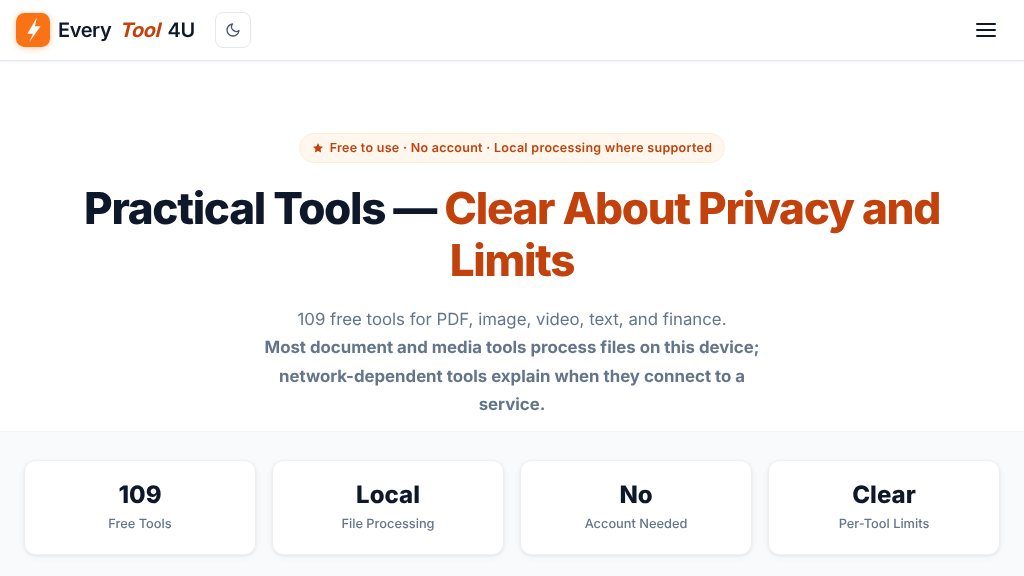
Website Overview
EveryTool4U sits within the broader web tools and SaaS category, where browser-based utilities help people complete focused digital tasks without installing dedicated software. That category matters because many occasional jobs—converting a file, cleaning up text, resizing an image, or checking a document—do not justify a full desktop application. The site presents a collection of 109 free online tools covering PDF, image, video, text, utility, office, loan, and generator-related tasks.
The website also emphasizes that no account is needed. Its privacy notice says most document and media tools process files on the user’s device where supported, while tools that depend on a network connection explain when they connect to a service. That distinction is useful, although visitors should still review the individual tool’s limits before uploading sensitive material.
Experience and Functionality
The collection is organized with category filters and a search field for browsing all 109 tools. This makes the directory more practical than a single undifferentiated tool page, particularly for users who know the task they need but not the exact utility name.
PDF coverage is especially broad. Available functions include merging, splitting, compressing, rotating, watermarking, signing, OCR, page extraction, redaction, format conversion, editing, comparison, and webpage-to-PDF conversion. Image utilities handle resizing, cropping, format conversion, background removal, watermarking, photo editing, passport photos, and basic upscaling. Video tools include compression, conversion, trimming, merging, subtitle addition, video-to-MP3 extraction, GIF creation, and browser-based screen recording.
The text and developer-oriented tools provide another useful layer: word counting, case conversion, regex-enabled find and replace, duplicate removal, text comparison, Base64 and URL encoding, Markdown preview, password and UUID generation, hashing, JSON formatting, CSV conversion, color picking, unit conversion, and timestamp conversion.
Strengths
- Broad collection spanning PDF, image, video, text, office, utility, and finance-related tasks
- No account is presented as necessary for using the tools
- Local file processing is indicated where supported, with network-dependent behavior explained
- Search and category filters help users navigate the 109-tool collection
Cons
- Processing behavior may differ between tools, so privacy details require per-tool verification
- The supplied evidence does not establish exact file-size limits, format compatibility, or output quality for every utility
- The collection is broad, but the available information does not document advanced workflows or integrations
Useful Scenarios and Likely Users
This collection may suit students, office workers, freelancers, content creators, and occasional developers who need quick browser utilities. It can also help someone preparing documents, converting media for sharing, cleaning structured data, or handling small text transformations without maintaining several separate applications.
Final Perspective
EveryTool4U appears best suited to users seeking a broad, no-account toolkit for straightforward file and data tasks. Its main appeal is the range of utilities and the clear indication that local processing is used where supported. Before relying on a tool for confidential files or important production work, confirm its processing method, supported formats, size limits, output quality, and any network connection requirements directly on the relevant tool page.
Embeds
Copy short script widgets for this listing. People often use Textfrog to search for their next personal or work tool. Encourage your community to leave reviews on Textfrog.
Review widget
A clean review badge with stars and review count.
Featured badge
A compact badge for products listed on Textfrog.
Similar Tools
Compare two texts online and see every difference highlighted instantly. with pr...
Free online keyboard tester for Windows, Mac, and laptops. with practical detail...
Convert JPG to PDF free in your browser. with practical details for online visit...
Free football data API for developers: fixtures, live scores, standings, teams, ...
Featured Links
Eduify is an online education platform that provides tools and resources for lea...
Setvo: your workouts, your progress, your space. with practical details for onli...